
Please share this newsletter with colleagues in your setting.
Welcome to Issue 5 of your weekly briefing on all things AI.
As AI continues to reshape the educational landscape, our mission is to ensure South Tyneside schools stay ahead of the curve. Whether you are an AI novice or an AI expert, this is your weekly home for the tools and digital principles defining the future of education.
Each week, we’ll deliver three or four essential updates—ranging from DfE policy shifts to time-saving classroom hacks—specifically curated to reduce teacher workload and enhance learning across our South Tyneside community as safely as possible.
AI Champions Work Group
Haven’t nominated an AI Champion yet?
👉 CLICK HERE to access our nomination form.
- Next Meeting: Wednesday 11th November 2026, 16:00-17:30
- Venue: The Word
- Contact: Julia Small to book a place at [email protected]
Item 1: AI is changing Google Search – What primary teachers need to know
Google Search is undergoing its biggest transformation in 25 years with the rollout of “AI Mode,” which trades traditional website links for direct, conversational AI answers.
While this makes searching more fluid, it poses a unique challenge for primary classrooms. Because the AI delivers a single, highly confident response, pupils may stop comparing multiple sources—a vital skill for Key Stage 1 and 2 learners.
To help children navigate this shift safely, schools are encouraged to pair standard filtering safeguards with explicit AI literacy lessons, teaching young learners to question, evaluate, and fact-check AI-generated answers rather than taking them at face value.
Computing At School Blog post written by Ben Davies. > 🔗Read the full article here
Item 2: Prompt of The Week
Photograph a child’s drawing and AI it!
“Turn my drawing into a 3D Pixar style illustration.”
Photograph a child’s drawing and AI it!
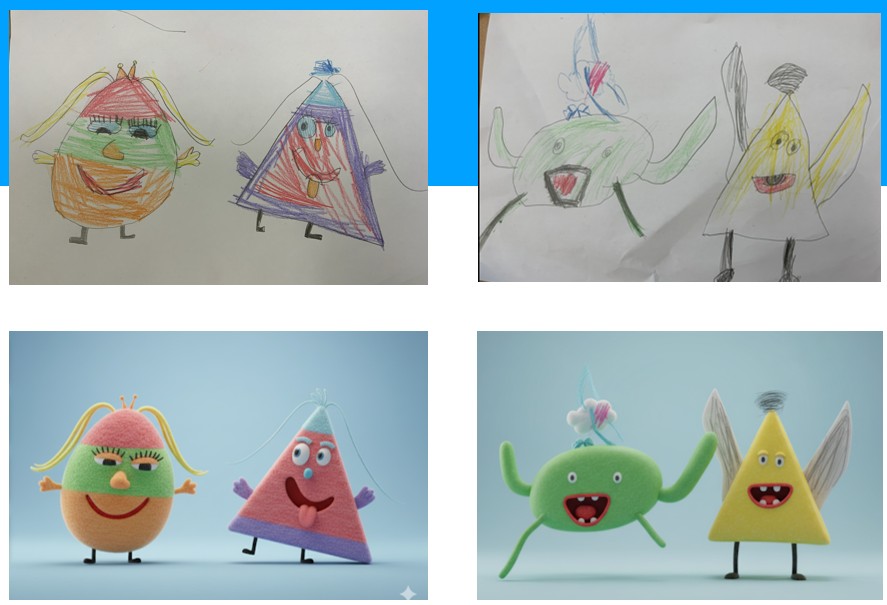
Ways to use AI images in the classroom
- Character Illustrations: Ask children to describe a book character or historical figure, then generate an AI image to support writing or display.
- Visual Story Starters: Use AI to create unusual or surreal images as creative writing prompts.
- Topic Posters: Generate themed visuals (e.g. The Great Fire of London, rainforest animals) to support topic work or classroom displays.
- Designing Classroom Mascots: Create class or subject mascots to represent values, school rules, or curriculum areas (e.g. “Coding Cat” for Computing).
- Image Comparisons: Show real vs AI-generated images and ask children to spot differences or discuss what makes an image believable (links to online safety and media literacy).
Item 3: 🌟 Quick Win for Your Next Staff Meeting
Next time you have 10 minutes of CPD with your staff, show them the NotebookLM Audio Overview.
Drop your school’s complex School Development Plan or a New Curriculum Guidance document into NotebookLM, click “Generate Audio Overview,” and let staff listen to a 10-minute AI-generated, podcast-style discussion of the policy while they drive home.
It is a massive workload-saver that always gets a “wow” reaction from teachers. The file is downloadable, too! You can even interact with the audio overview within NotebookLM using your microphone to ask questions and engage with the audio.
I created a brief audio overview of the KCSIE (Keeping Children Safe in Education) document. Click below to hear it:
AI Newsletter Feedback Form
We really would appreciate your feedback!
Please use our Feedback Form to add any comments, suggestions, or examples of how AI is being used in your setting.
- You can remain anonymous if you prefer.
- You can even add files if you think it would be helpful.
Remember, your feedback is important to us and will help with future Newsletters. Thanks!
Questions or Suggestions?
If you have any questions or suggestions, please contact:
Steve Robert: [email protected]