
Cookies on this website

We use some cookies to make this website work. With your permission we would also like to use cookies that help us understand how the website is used and measure our advertising. You can accept or reject these, or choose which ones to allow.

Choose which cookies we can use
  • 0191 424 6336
  • [email protected]
ICT in Schools Logo
  • Our Services
    • About Us
    • Meet the Team
    • The Word in 360º
    • Fab Lab @The Word: Digital Fabrication & STEM for Schools
    • Website Support
    • Professional Development
    • Loan Resources
    • Planning a visit
    • News
    • 5 minutes on Friday
    • AI – The Prompt
    • Equality, Diversity and Inclusion
  • Computing
    • Curriculum
    • AI Literacy & Guidelines
    • Policies
    • ClickView in South Tyneside
    • CAS Primary Hub
    • Digital Careers
      • Digital Careers
    • Mr R’s Escape Rooms
    • First Lego League “Bioglow” 2026/7 Season
  • Online Safety Hub
  • E-Safety
    • Online Safety Hub
    • Smoothwall Monitor
    • AI in Education
      • AI Policy
    • E-Safety
    • E-safety News
  • Community
    • The Word
    • Fab Lab
    • Literacy
    • Stronger Schools
    • Financial Support
    • Young Health Ambassadors
    • MFL
      • French
      • Spanish
    • South Tyneside Apple RTC
  • CPD@Openzone
    • CPD@Openzone
    • Autumn 2026
    • Spring 2027
    • Summer 2027
ICT in Schools Logo
  • Our Services
    • About Us
    • Meet the Team
    • The Word in 360º
    • Fab Lab @The Word: Digital Fabrication & STEM for Schools
    • Website Support
    • Professional Development
    • Loan Resources
    • Planning a visit
    • News
    • 5 minutes on Friday
    • AI – The Prompt
    • Equality, Diversity and Inclusion
  • Computing
    • Curriculum
    • AI Literacy & Guidelines
    • Policies
    • ClickView in South Tyneside
    • CAS Primary Hub
    • Digital Careers
      • Digital Careers
    • Mr R’s Escape Rooms
    • First Lego League “Bioglow” 2026/7 Season
  • Online Safety Hub
  • E-Safety
    • Online Safety Hub
    • Smoothwall Monitor
    • AI in Education
      • AI Policy
    • E-Safety
    • E-safety News
  • Community
    • The Word
    • Fab Lab
    • Literacy
    • Stronger Schools
    • Financial Support
    • Young Health Ambassadors
    • MFL
      • French
      • Spanish
    • South Tyneside Apple RTC
  • CPD@Openzone
    • CPD@Openzone
    • Autumn 2026
    • Spring 2027
    • Summer 2027
ICT in Schools home
  • Our Services
    • About Us
    • Meet the Team
    • The Word in 360º
    • Fab Lab @The Word: Digital Fabrication & STEM for Schools
    • Website Support
    • Professional Development
    • Loan Resources
    • Planning a visit
    • News
    • 5 minutes on Friday
    • AI – The Prompt
    • Equality, Diversity and Inclusion
  • Computing
    • Curriculum
    • AI Literacy & Guidelines
    • Policies
    • ClickView in South Tyneside
    • CAS Primary Hub
    • Digital Careers
      • Digital Careers
    • Mr R’s Escape Rooms
    • First Lego League “Bioglow” 2026/7 Season
  • Online Safety Hub
  • E-Safety
    • Online Safety Hub
    • Smoothwall Monitor
    • AI in Education
      • AI Policy
    • E-Safety
    • E-safety News
  • Community
    • The Word
    • Fab Lab
    • Literacy
    • Stronger Schools
    • Financial Support
    • Young Health Ambassadors
    • MFL
      • French
      • Spanish
    • South Tyneside Apple RTC
  • CPD@Openzone
    • CPD@Openzone
    • Autumn 2026
    • Spring 2027
    • Summer 2027

Contact the school

Call 0191 4246334

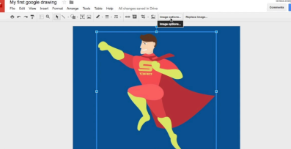
Class Follow on Session: Y5 Vector Graphics – Using Google Drawings

Class Follow on Session: Y5 Vector Graphics – Using Google Drawings

After Year 5 teachers attended a DUO CPD hands-on training session the Year 5 teachers have the skills to confidently deliver engaging vector graphics lessons.  Learn how to use Google
Draw and other vector-based tools to create and edit digital graphics, enhancing creativity in the classroom.

Session Objectives: (Links directly to – Y5 Teach Computing – Vector Graphics Unit)

Who is it for?
The children will learn how to use Vector Graphics and Google Draw to create digital graphics.


Address

ICT in Schools Team

OpenZone@The Word

45 Market Place

South Shields

NE33 1JF

Contact Us

ICT In Schools
Open Zone @ The Word
45 Market Place
South Shields
NE33 1JF

0191 424 6336

[email protected]

Website Accessibility Statement | South Tyneside Apple RTC Twitter Feed

School website powered by Realsmart Logo